Practice Assistant: the AI that manages your schedule, payments and invoices
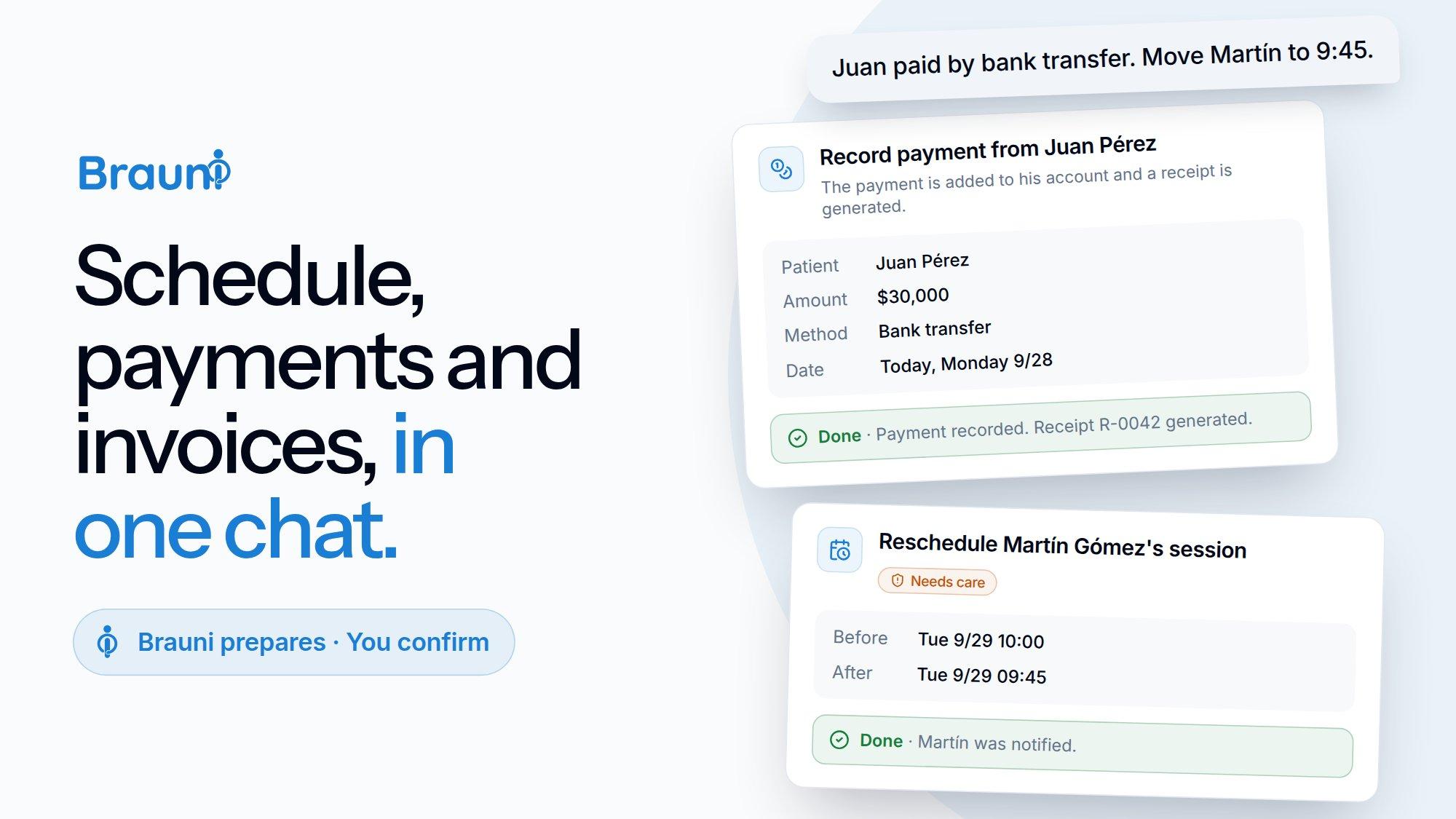
You've finished the day. You saw six patients, one didn't show up, two paid by bank transfer and one asked to move Thursday's appointment. Now the other workday begins: marking sessions, entering payments, moving the appointment, issuing invoices and sending receipts. That's five different screens and half an hour that isn't clinical.
That's why we created the Practice Assistant: you write what happened, the way you'd tell a secretary, and Brauni prepares everything. You review and confirm every change with one click.
"Everyone came except Ana. Juan paid me 30k by transfer. Invoice today's sessions and move Martina to Tuesday at 6 pm."
With that message, the assistant leaves the cards ready to close the sessions, record the payment, issue the invoices and reschedule the appointment.
How it works: the AI proposes, you decide
The Practice Assistant is its own chat, separate from the clinical assistant you use inside each patient's record. You'll find it in the menu as Practice Assistant.
The most important rule: the assistant never changes anything on its own. It can look up your schedule, payments and invoices to answer you, but everything that modifies data (scheduling, charging, invoicing, sending an email) first appears as a confirmation card:
- The card shows exactly what is going to happen: patient, date, amount, invoice recipient, who receives the email.
- If the card has several rows (for example, closing the day), you can uncheck the ones you don't want.
- If something changed since the card was prepared (for example, someone took that time slot), Brauni doesn't run it and lets you know.
- Irreversible actions or those that reach third parties (ARCA invoices, emails to patients) are marked "Needs care".
Note
Made a mistake? Ask it to "undo the last thing" and the assistant prepares a card to reverse it: it re-schedules a cancelled session, deletes a wrongly entered payment or restores a fee. The only things that can't be undone are those that have already left Brauni: invoices authorized by ARCA (that's what the credit note is for) and emails already sent.
And after you confirm, the assistant keeps going: if you created a patient, it offers to schedule their first session or send them the consent form; if you recorded a payment, it offers to send them the receipt.
Scheduling
- "What do I have today?", "and Thursday?": your schedule for the day or the week.
- "When can I see Juan next week in the afternoon?": it looks for genuinely free slots within your working hours.
- Schedule a session or a series (weekly, biweekly or monthly), in person or online with a Meet link, and optionally notify the patient by email. If the time conflicts with another session or a pending directory booking, it warns you first.
- Couples or family sessions: "schedule Ana and Juan together on Thursday at 7 pm" creates one session per patient, each with its own charge, in a single calendar event. If you reschedule one, they all move.
- Reschedule a session or an entire series: "starting next week, Martina comes on Tuesdays at 6 pm".
- Holidays: "Monday is a holiday, move all sessions to Tuesday" moves each session to the same time the next day. Those that conflict come unchecked so you can decide.
- Vacations and days off: "I'm not seeing patients from January 10 to 20" blocks those days (no appointments are offered on your public profile), cancels the sessions in that period and, if you want, notifies each patient.
- Sessions that already happened: "Juan came yesterday at 6 and I hadn't scheduled it" records it directly as completed, with its charge.
- Waiting list: add patients who are looking for a time slot and the assistant suggests openings that work for them.
- Directory bookings: accept or decline the appointment requests that come in from your public profile.
- Email reminders for tomorrow's sessions (in addition to the automatic WhatsApp reminders).
Closing the day and cancellations
- "Everyone came except Ana": a single card with all of the day's sessions, with Ana marked absent. When you confirm, charges are generated according to each patient's fee, or deducted from their monthly pack.
- Close and invoice in one step: "close them and invoice them" closes the sessions and issues the ARCA invoices in the same confirmation.
- Patient cancellations: "Juan cancelled today's" records it as cancelled by the patient (without sending him an email). The card shows how many hours in advance he gave notice and, if applicable, you can charge for the late cancellation according to your no-show policy.
- Unclosed sessions and missing charges: it tells you which past sessions are still open and which ones didn't generate a charge.
Payments and fees
- Record payments in natural language: "30 lucas", "30k" or "thirty thousand" all become $30,000 (it understands Argentine shorthand for amounts). The card shows you the balance before and after.
- Payments for specific sessions: "he paid for both August sessions" applies the payment to those sessions, even if he has older debts.
- "Which sessions does Juan owe me for?": unpaid or partially paid sessions, with date and amount.
- "Who owes me money?": the list of debtors, and a payment reminder by email for the ones you choose, with their balance updated at the time it's sent.
- Receipts by email as PDF, discounts and account adjustments.
- Monthly packs: "Ana paid for a pack of 4 sessions" and upcoming sessions are deducted from the pack.
- Finer-grained fees: a different price for online sessions and another for the first interview, applied automatically when you close the session.
- Inflation increases: "how much has inflation risen this year?" checks the INDEC CPI, and "raise everyone by that percentage from the 1st, rounding to 500" shows you each patient's old and new fee before you confirm.
ARCA electronic invoicing (formerly AFIP)
- "Invoice Ezequiel for today's session": issues the Factura C (Argentine invoice type) for that patient only. If the session wasn't closed, it closes it and invoices it on the same card.
- "Invoice everything collected in September": one invoice per patient, with each one's total, and you can uncheck anyone you don't want to invoice.
- Invoices for a custom amount: "issue an invoice for 150k to Juan for fees".
- The right recipient: by default, the patient as Final Consumer with their national ID (DNI). If needed, to a company's CUIT or to a Monotributo taxpayer (Argentina's simplified tax regime). For minor patients, the invoice goes to their custodial guardian.
- Retries and credit notes: resend to ARCA the invoices that were left pending, and cancel an authorized invoice with its credit note.
- Send the invoice by email, only once it has a CAE (ARCA's authorization code).
- Set up ARCA step by step: "I want to start invoicing" and the assistant guides you through each step (generating the certificate, authorizing the service, choosing the point of sale) and verifies with ARCA that it was done correctly. It never asks for your Clave Fiscal: you enter that yourself on the ARCA website.
Patients, documents and messages
- Quick patient registration: with administrative data. If the patient is a minor, the assistant asks you for their guardian's details.
- Update details: contact, health insurance, guardians (add the mother, change the father's phone number), enable reminders, archive or reactivate.
- Informed consent forms: "who hasn't signed the consent form?" and "send Juan the consent form to sign online".
- Attendance certificates as PDF, to download or send by email.
- Messages to your patients: "let everyone know I won't be seeing patients next week". You draft the text with the assistant, see it in full on the card and it's sent by email. Replies come to you.
- For your accountant: a monthly file with transactions, invoices and balances, ready to download.
Your practice in numbers
- "How much did I invoice this month compared to last month?", income by patient or by health insurer.
- Monotributo: how much room you have left in your category (it's always a good idea to confirm with your accountant).
- "What did I do yesterday?", "did I send Juan the receipt?", "did I invoice Ana this month?": the assistant summarizes what you did in the period.
Voice messages too
Between sessions with no time to type? Send it a voice message. The assistant transcribes it, shows you the text as your message and replies just as if you had typed it. The audio is processed and discarded: it is not stored.
Council
Mention your patients with @ so the assistant knows exactly who you're talking about. If you write "Juan" and you have two, it will ask you which one. It never guesses.
Privacy: administration yes, clinical record no
The Practice Assistant is designed for the administrative side, and that's why it has clear limits:
- It doesn't access session notes, clinical records or reports. It only sees administrative data: names, schedule, payments and invoices. For clinical matters, there's each patient's assistant.
- It only sees your data: every query and every change is limited to your account.
- Everything is encrypted: conversations, proposals and their results.
- Every email shows who receives it and why before you confirm it. An adult patient with no email never receives notices through a relative or emergency contact; for minors, emails go to their custodial guardian.
- Everything is audited: every confirmed action is logged.
Note
The Practice Assistant is available on all plans and uses your monthly AI tokens, like the rest of Brauni's artificial intelligence features.
Get started today
Open Practice Assistant from the Brauni menu and try something simple: "what do I have tomorrow?". Then, at the end of your day, tell it how it went and let it prepare the rest.
For a one-page overview, see the Practice Assistant page.
Free Brauni test for 30 days, no card
Automatic session notes, digital medical records and more.
Start for freeRelated articles

Artificial Intelligence
Library with AI: upload your manuals and your assistant reads them for you
Upload your test manuals, notebooks from your reference authors, and notes to Brauni. Your AI assistant answers your questions by quoting the exact document and page.

Management of clinical practice
Monotribute for psychologists: high, categories and invoicing
Monotribute guide for psychologists in Argentina: high step by step, how the categories work, the semi-annual recategorization and the C invoices per session.
Privacy and Security
Do you use ChatGPT to write clinical reports? What you need to know about your data
What happens to your patients' data when you use ChatGPT, Gemini, or other generational AIs to write clinical reports or notes. Legal, ethical, and safe alternatives.